
SLO Tribune debuts a new eEdition. It’s easier to use and packed with news
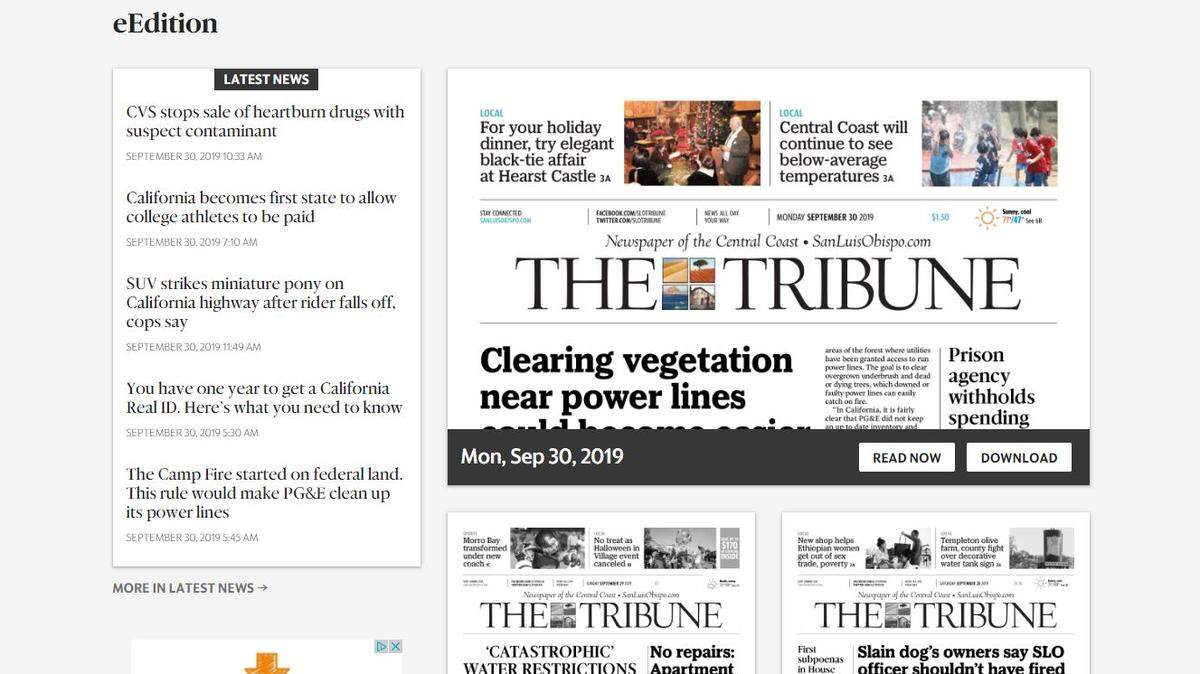
Today, we’re rolling out a brand-new eEdition, the digital replica of The Tribune that’s packed with everything in your printed newspaper plus many extra pages of news, sports, features and puzzles.
The new format is easier to use, and we made many of the improvements based on consistent reader feedback.
We heard from readers that we needed to improve the ad experience. We also wanted to make it easier to read an article, so we removed the red highlighting and added a simple article view. We also heard from a lot of readers that the “help” overlay was confusing. So we created a visual guide instead.
Here’s a look at some of the highlights of the new version:
Reduced the number of ads on the page and removed any ads that block the eEdition.
Removed the “red highlighting when you hover over a story on a page. Readers told us this can make reading harder. You can zoom in or open up each article individually for an article view.
Reduced and simplified the icons and navigation lists in the eEdition viewer.
Designed a new “portal” page that allows you to easily find past issues and breaking news on the website.
Removed the “help overlay” on the eEdition. Readers told us this experience was not intuitive. We hope to answer any questions in an FAQ and visual guide that can be found by clicking the “Help” icon in the top right of the eEdition viewer.
Made it easier to open up an individual article. If you click or tap once on an article on the page, a plain-text view of the article will open. You can adjust the text size, print and share the article from there. Want to zoom into an article instead? Just double click or use the “plus” icon!
Because the eEdition is a subscriber exclusive, you’ll need to be logged in to access it.
If you are a print subscriber and haven’t activated your digital access, you can do so at https://account.sanluisobispo.com/digital-access.
Once you’re logged on, in addition to local news from The Tribune, the eEdition includes dozens more pages of news, features and sports stories and scores on the Extra Extra and Sports Extra pages. It offers content from our sister McClatchy newspapers and the Associated Press plus Tribune and New York Times syndicates.
The eEdition works on desktop, tablet and mobile phone, and it won’t log you out unless you’re inactive for 30 days. Also, you no longer need a separate app to access it.
The eEdition is available direct from The Tribune app or website. It works best with updated versions of Chrome, Safari, Firefox or Edge browsers. If you encounter issues or have additional questions, check out our FAQ here.
Ready to explore? Here are some tips to start:
- The icon for the eEdition is still found at the top left of the website.
- You will see the eEdition title on the new landing page.
- Scroll to see the current or past 13 newspapers and click “read now.”
- The landing page also includes links to the latest news on the website.
- Use the arrows on the sides to move through pages.
- Section navigation is across the top of the page.
- The calendar icon in the upper left returns you to the landing page to see other editions.
- The icons at the top right allow you to print or download, zoom in and out on the page, and find games.
Are you a puzzle fan? To print out just the daily crossword from the newspaper puzzle page, click the crop icon in the navigation bar at top right. If you’re viewing two pages, select either the left or right page. A crop box will appear on that page. Click on the corners and drag the box around the puzzle (or portion of the page) that you want to print. Once you are done, click the green checkmark in the lower right corner. The cropped image will open in a new browser tab. You can print from there, or save the image to your desktop and open and print in the program of your choice.
If that’s not enough for puzzle players, click the puzzle icon in the navigation bar at top right. You’ll find 18 crosswords, plus scrambles and searches you can play digitally. That’s just the word games. You’ll also find card and arcade games, puzzles and strategy games.
You will need to change your bookmark the first time you access the eEdition to return to the new site. You will continue to get a daily reminder email alerting you that the eEdition is ready.
We hope you enjoy The Tribune’s new eEdition. You can find it at www.sanluisobispo.com/e-edition. If you have any problems, drop us a note at customerservice@thetribunenews.com.
This story was originally published October 1, 2019 at 5:10 AM.